Today
What slows you down today
- Every copy change becomes a ticket for the agency or IT
- Plugin updates and security patches cost time and budget
- The relaunch keeps slipping — for fear of losing rankings
For marketing teams on WordPress or TYPO3
Your WordPress or TYPO3 site moves to Webflow with its content, redirects and SEO basics. After that, your team runs it themselves — no plugin updates, no developer tickets.
Why teams move
Your team changes copy, images and new landing pages directly in Webflow — no developer needed.
No plugin updates, no PHP versions. Hosting, SSL and security updates are handled by Webflow.
Content, redirects, SEO basics and QA belong before launch, not after it.
Why switch
Webflow is not right for every project. For company, marketing and content websites it is often the much simpler route.
Today
After the move
Website checker
Our free website checker shows in under a minute, as a chart, where your website is strong and where the potential lies: performance, SEO, accessibility, AI access and more. No sign-up.
The engagement
Services
Not just a more modern look. Something that works day to day and in search.
Pages, media and CMS structure move across — tidied up on the way, not copied one to one.
Every old URL gets a destination. Redirects, metadata and sitemap are in place before the switch.
Collections, templates and components built so your team creates new pages without a developer.
Process
Audit. Rebuild. Switch over.
We go through the CMS, the page types, the content and every existing URL.
We model collections, templates and components and bring the content across.
We test redirects, forms and tracking, then switch over in a controlled way.
In practice
PLEVA has developed and manufactured sensors and measurement technology since 1969. In November 2026 we moved pleva.org from TYPO3 to Webflow. The look stayed the same; the system underneath is new.
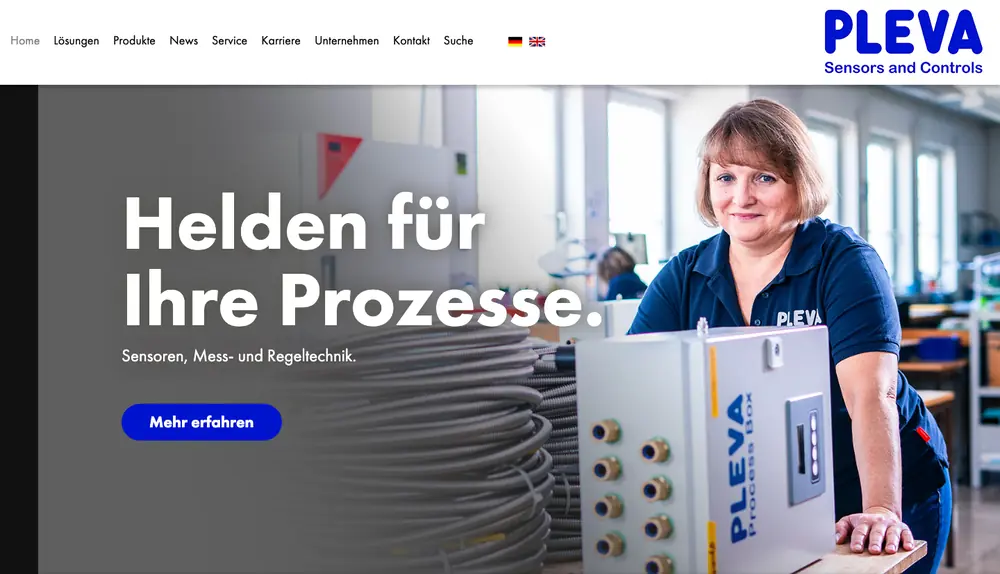
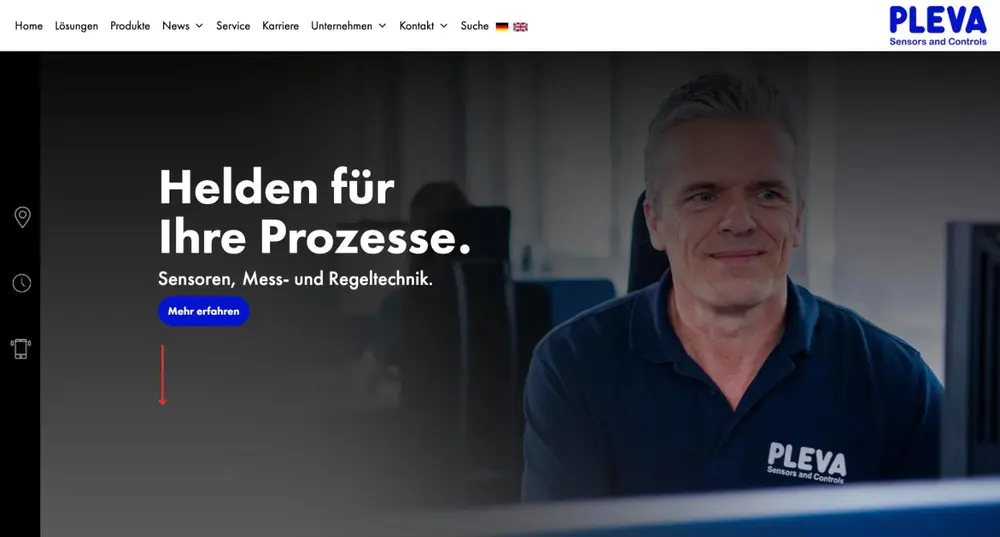
Before: homepage in the Internet Archive, May 2026. After: pleva.org, November 2026.
FAQ
Nobody credible guarantees rankings. What feeds them can be protected: URLs, redirects, metadata and structured data are in place before the switch.
For marketing, company and content websites with a clear page model. There Webflow cuts maintenance and makes the team less dependent.
A lean marketing site with one or two dozen pages: four to six weeks. Grown setups with many templates, multiple languages or custom logic take longer.
It depends mainly on page types, amount of content, languages and custom features, less on the raw page count. After the free check you get a quote with a clearly defined scope. On top come the running costs of the Webflow hosting plan.
Yes. We typically transfer page content, CMS structure, redirects and metadata, and check forms and tracking before launch.
Yes, throughout. AI agents crawl the old website, build the URL inventory, move the content into Webflow and check redirects, metadata and links automatically. Structure, decisions and sign-off before launch stay with us.
No. Webflow is often strong for company, marketing and content websites. If processes, roles, multilingual requirements or custom logic speak against it, we say so clearly.
It detects the CMS, analyses the sitemap URLs and checks languages, HTTPS, SEO basics, mobile performance, accessibility, images, the preview in Google and when shared, connected services and blocks on AI crawlers. From that it names typical risks of the move and your next steps. It is an automatic quick analysis of the homepage, sitemap and a sample of subpages. For a real assessment with a timeline, use the free check.
Yes. We work fully remote with clients across Europe and worldwide, in English or German. Coordination happens by email and video call, so no on-site meetings are needed. Calls take place during Central European business hours.
We look at your website and reply by email within 48 hours: whether Webflow fits, where the risks are and how a move would work. You only get a quote if you want one.
Send us the URL. Within 48 hours you get an honest assessment by email — including if it says Webflow is not the right fit.
Or contact us directly:
hello@switchto.dev